Confession
The marketing tools I actually use vs. the ones I recommend
An honest look at the gap between 'best tools' lists and what a working marketer actually has open every day. Some expensive tools gather dust. Some free ones do the heavy lifting. Here's the real stack.
The honest truth about marketing tools is that the ones I use every day and the ones I’d recommend on a call are not the same set. I’ve been embarrassed about this for a long time and I’m done being embarrassed.
I’m going to walk through both lists side by side — the “what I actually open in my browser” stack and the “what I tell clients to buy” stack — and tell you why they don’t match.
The tools I open every day
Here, in rough order of how often I use them, is the actual stack I work in:
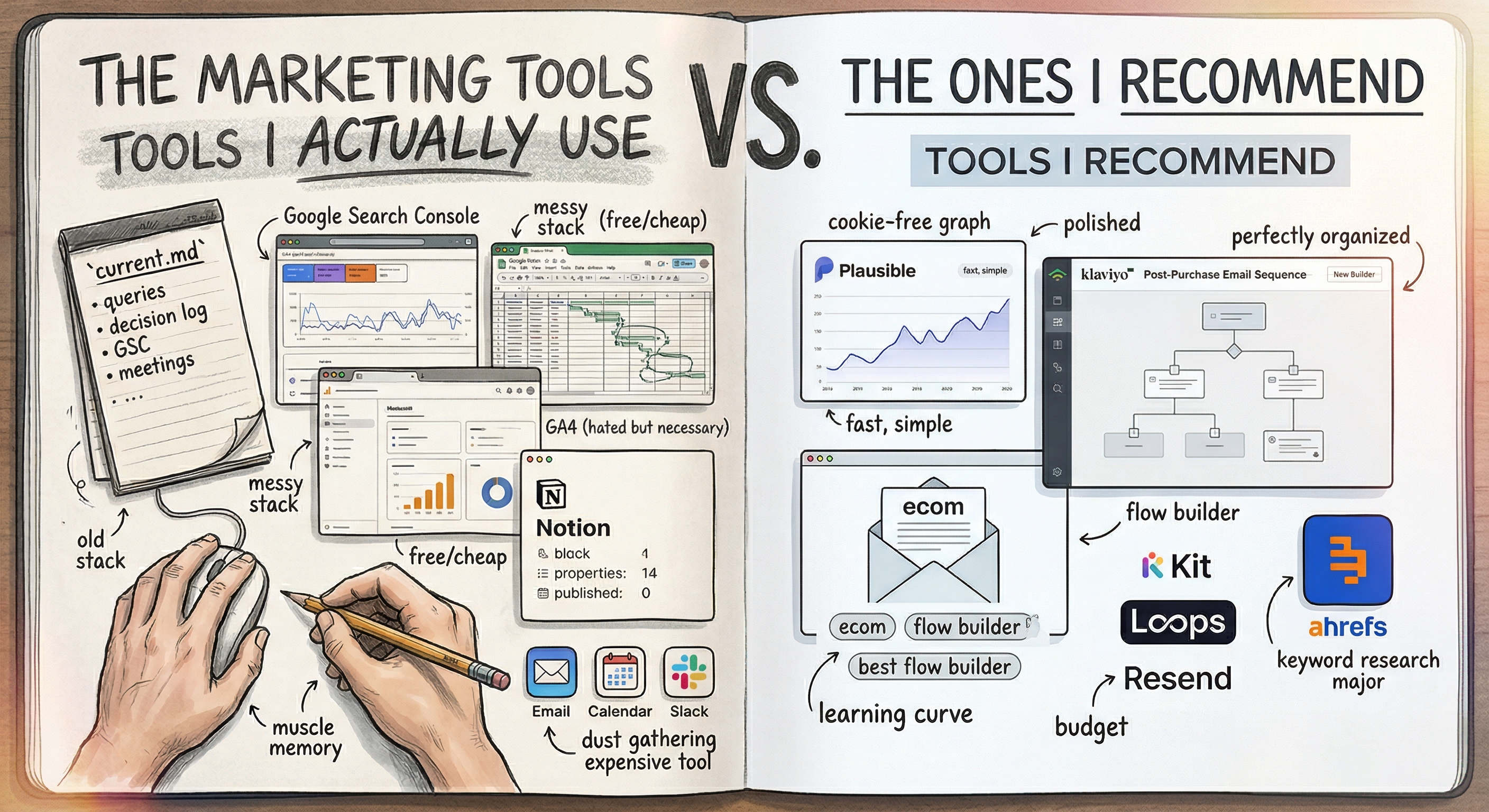
Google Search Console — every day, free
The most-used SEO tool I have, by a wide margin. I open it more than any paid SEO tool. It gives me the queries the site is actually getting impressions and clicks for, broken down by page, country, and device. The data is one or two days behind, the interface has been the same for five years, and I would not trade it for any other product on the market.
If you only had two SEO tools, this would be one of them. The other one would be the next item.
A spreadsheet — every day, free
I have a Google Sheet open on every client engagement. It’s where the page inventory lives, the keyword targets, the backlinks, the technical issues, the content calendar, the running log of decisions. I have written 4,000 words on what running SEO for a small business actually looks like and the spreadsheet is the heart of the engagement.
Every “SEO platform” on the market wants to replace the spreadsheet. None of them have. The spreadsheet wins because I can shape it to the exact engagement and because exporting from it to email a client is one click. The big platforms make you live inside their dashboard. The spreadsheet makes me self-sufficient.
Google Analytics 4 — every day, free, hated
Look. GA4 is not a good product. The interface is hostile. The reports are slower than they need to be. The terminology is gratuitously different from anything anyone learned in the GA Universal era. I hold my nose and use it because (a) it’s free, (b) it’s where the data is, and (c) every client already has it installed.
I do not love it. I would happily switch to Plausible or Fathom tomorrow if I could. For most of my clients I can’t, because GA4 is the corporate default. So I use GA4. The recommendation I give to a client setting up analytics for the first time is not GA4 — it’s Plausible. The tool I’m in five times a week is GA4. That gap is the whole point of this article.
Notion — multiple times a day
This is where my client docs live, where I write briefs, where I keep notes, where I have a personal “second brain” of the things I’ve learned. I’m not loyal to Notion specifically — Obsidian, Logseq, Apple Notes would all do most of the same job. I use Notion because I started using it years ago and the cost of switching is higher than the cost of putting up with its slow web app. If I were starting fresh today I’d probably go with Obsidian for its local files and its fast loading.
I rarely recommend Notion to anyone. Most people who start with Notion end up over-organising it, building elaborate dashboards, and never writing anything. I once watched a content team spend three weeks building a “brand database” in Notion with 14 properties and zero published posts. A folder of Google Docs would have been faster. The tool encourages this. If you are not already in deep, do not start.
A plain text file called current.md — every day, free
I am not joking. I keep a single markdown file called current.md on my desktop, and every morning I open it, type the date, and write three to five bullet points about what I’m doing today. At the end of the day I write what I actually got done. At the end of the week I copy the bullet points into a Friday note for clients. The file is now about 800 days long.
This is the most-used productivity tool in my entire workflow and it cost me zero pounds. I will never recommend it to anyone because everyone else needs an app.
Hotjar or Microsoft Clarity — weekly, mostly free
For session recordings and heatmaps. I use whichever one the client already has. Clarity is free and surprisingly good. Hotjar is paid and incrementally better in ways that don’t really matter for most engagements. Twenty minutes of session recordings once a week tells me more than any analytics dashboard can.
Almost nobody on a small team actually watches session recordings, and almost everyone who starts watching them changes their mind about something they thought they knew. This is the underrated tool of the entire stack.
Ahrefs or Semrush — twice a week
I have one of these depending on the engagement. Both are expensive. Both are good. The truth is that I use them for two things: checking what a competitor’s backlinks look like, and looking up the search volume on a specific keyword. I do not use 90% of what they offer. I would not pay for one out of my own pocket if I weren’t billing it through a client.
If you’re a marketer at a small business and you’re trying to decide whether to subscribe to Ahrefs or Semrush — you probably don’t need to. The two things you use them for can mostly be done with Google Search Console, Google Trends, and a bit of patience. Save the £150/month.
Email, calendar, Slack — every day, several hours
The actual marketing tool nobody puts on the list is the email and meetings stack. This is where the work happens. The cleverest tactic in the world dies because someone didn’t reply to your email, or because the dev call got moved, or because the design review never happened. Half of being a marketer is operating the chase-up infrastructure.
The tools I recommend on calls
When a client asks “what should we be using?” the list I give them is shorter, cleaner, and more expensive. It’s also the list that I think will work for them, not the list I personally enjoy.
- For analytics: Plausible. Privacy-respecting, no cookies, fast, simple, costs about $9/month for a small site. I love it. I have it on my own personal sites. I cannot use it on most client engagements because the client has GA4 already and switching costs are not worth it for the marginal improvement. But if you’re starting fresh, Plausible.
- For email marketing: Klaviyo for ecommerce, ConvertKit / Kit for creators and content businesses, Loops or Resend for SaaS. I have used all of these in real engagements. Klaviyo is overpriced and dominant for a reason — its flow builder is the best in the category. The post-purchase email sequence I usually build runs in Klaviyo by default.
- For SEO platforms: Honestly, Google Search Console. If pushed, Ahrefs — but only for engagements where keyword research is a major component. For most small-business engagements, Search Console plus a £20/month rank tracker like Wincher or Nightwatch is plenty.
- For session recordings: Microsoft Clarity. It’s free, it’s surprisingly polished, it does the job. The fact that it’s a Microsoft product feels weird and is irrelevant.
- For paid social campaign management: Whatever the platform’s own ads manager is. Third-party tools like AdEspresso etc. are mostly fancier UIs over the same APIs and rarely justify the cost for a small advertiser. (Related: I have written about how I lost £2,000 of a client’s money on Facebook Ads — the tooling wasn’t the problem.)
- For project management: Whatever the team is already using. Switching teams off Asana onto Linear because I prefer Linear is a cost the team pays and I don’t. The best PM tool is the one already adopted.
- For research and brief-writing: A spreadsheet and a markdown file.
Why the lists don’t match
There are three honest reasons.
One: I’m using what I started with. A lot of my personal tooling is the residue of decisions I made years ago and haven’t reviewed since. Notion was the right call in 2019 and I just kept using it. GA4 wasn’t a choice — it was forced on me by Google killing Universal Analytics. The tools I’d choose today are not always the tools I have.
Two: Recommendations are for people, not for me. When I recommend a tool to a client I’m thinking about their learning curve, their team, their support needs, their budget. When I pick a tool for myself I’m thinking about my muscle memory and the next deadline. Those are different optimisation functions and they produce different answers.
Three: I undervalue the polish of good tools because I can put up with bad ones. I have used a spreadsheet so much that I have stopped noticing its limitations. A new marketer would notice them immediately. So when I tell a client “you don’t need a fancy SEO platform, just use a spreadsheet,” I’m being honest about my workflow but not about theirs. They might genuinely need the polish.
When I recommend a tool to a client I’m thinking about their learning curve. When I pick a tool for myself I’m thinking about my muscle memory and the next deadline.
What this means for “best tools” lists
Most “best tools for marketers in 2026” articles are wrong in the same way: they assume the right tool for you is the same as the right tool for everybody. It isn’t. The right tool for you is whichever one you’ll actually use, that fits your existing workflow, and that doesn’t make you feel like you’re paying tax to be allowed to do your job.
If you’re building a stack from scratch: pick the smallest set of tools that gets the work done, and don’t add a new one until something breaks. Every tool you add has a cost — a subscription, a learning curve, a context switch, a thing your teammates have to be trained on. Most marketing teams I’ve seen are over-tooled and under-shipped.
The exception is the free, low-friction tools: Search Console, Clarity, Plausible, a markdown file. Add those liberally. They have almost no cost and they reward effort.
If you want a piece in a similar key, I spent £2,000 on Facebook Ads that bombed is another confession in the same series — about a different kind of marketer mistake. Or, for a piece about a tool category I’m very skeptical of, stop A/B testing your button colours.
The best tool I have is a markdown file. The tool I most often recommend to clients is Plausible. Both are true.